#Product Trends
Radiometric Thermal Imaging: What It Measures and When You Need It
Radiometric thermal imaging uses a calibrated camera and measurement model to measure apparent surface temperature across an image. Unlike an imaging-only thermal camera, it preserves quantitative information that can support temperature analysis for
Radiometric thermal imaging uses a calibrated camera and measurement model to measure apparent surface temperature across an image. Unlike an imaging-only thermal camera, it preserves quantitative information that can support temperature analysis for pixels or measurement areas that meet the setup requirements.
When a thermal image reveals a hot spot, the next question is whether its temperature needs to be measured, documented, or compared over time.
Transformer
The key word is “estimate“. A radiometric camera measures infrared radiation that reaches its detector; it does not touch the target or directly sense internal temperature. The camera uses calibration data and correction parameters to convert detector response into a temperature estimate. These parameters may include surface emissivity, reflected apparent temperature, measurement distance, and atmospheric or external-optics transmission.
This capability matters when a decision depends on temperature rather than thermal contrast alone. Maintenance teams may need to compare similar components, trend a surface over time, document an inspection, or apply a defined alarm threshold. By contrast, an observation task may only need to show that one area looks warmer or cooler than another.
Radiometric therefore describes a measurement capability, not a guarantee that every displayed value is valid. Surface properties, reflections, focus, target size, measurement range, environmental conditions, saved-file content, and analysis procedure still determine whether the result supports the intended decision.
How Does a Radiometric Thermal Camera Estimate Temperature?
A radiometric camera does not convert color directly into temperature. It first measures infrared radiation, then uses calibration data and correction inputs to estimate the surface temperature that could have produced the received signal.
1. The optics collect infrared radiation
The lens forms an infrared image on the detector array. Each detector element responds to radiation from a small part of the scene. That radiation may include energy emitted by the target surface, energy reflected from the surroundings, and radiation affected by the atmosphere between the target and camera.
2. Calibration converts response to a temperature reference
During calibration, the camera response is characterized against reference sources over defined measurement ranges and operating conditions. This calibration provides the relationship that the measurement model uses to convert detector response into a temperature estimate. Calibration belongs to the camera and its measurement configuration, and adding a color palette to an uncalibrated image does not create radiometric data.
3. The measurement model applies correction inputs
The camera or analysis software uses supported inputs to account for target emission, reflected radiation, and measurement-path effects in the temperature estimate. The most familiar input is emissivity. Reflected apparent temperature represents the effective radiative temperature of the surroundings reflected by the target surface. Distance, atmospheric temperature and humidity, and external-optics transmission may also matter when the measurement path makes their contribution significant.
Motorized-Focusing-Thermal-Camera-at
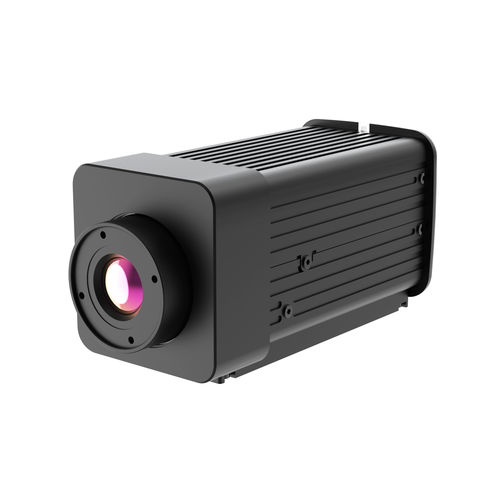
AT31 Motorized Focusing Thermal Camera
The AT31 motorized focusing thermal camera is a fixed radiometric thermal imaging product. Its documented correction inputs include emissivity, reflected temperature, atmospheric transmission, ambient temperature, and distance.
The output is an estimate of apparent surface temperature for the selected pixel or measurement area. It is not an automatic diagnosis of the equipment, and it does not reveal temperature beneath an opaque surface. The operator still has to decide whether the setup, procedure, and uncertainty are suitable for the task.
Radiometric vs. Non-Radiometric Thermal Imaging
Both systems can create a useful thermogram, but they support different decisions. An imaging-only camera shows relative infrared contrast. A radiometric camera provides calibrated temperature estimates, and supports quantitative analysis when those temperature data are preserved through the data path.
Question Radiometric system Imaging-only system
Shows thermal patterns Yes Yes
Provides calibrated temperature estimates Yes, within the specified measurement capability No
Supports spot or area temperature analysis Usually, with compatible camera functions or software Not as a calibrated temperature measurement
Allows later correction of measurement inputs Only if the saved format and software retain and expose the required data
No radiometric correction
Fits detection or observation tasks Often Often
Fits temperature-based inspection or trending Usually required Insufficient by itself
The distinction is not simply that more data is better. Imaging-only systems can be appropriate when the task is to detect a presence, locate a thermal pattern, or observe relative change. Radiometric capability becomes important when the workflow needs a temperature value, a repeatable comparison, a documented measurement, or a threshold based on temperature.
Do not use the color palette as the deciding factor. White-hot, black-hot, and other color palettes change how temperature differences appear to a viewer. They do not indicate whether the saved file contains calibrated measurement data.
What Affects a Radiometric Temperature Estimate?
A camera specification does not determine the reliability of a field measurement. The surface, viewing path, optics, target coverage, and selected measurement range affect the radiation reaching the detector and how accurately the measurement reflects the actual conditions.
Precise Location of Microscopic Defects and Hotspots in Semiconductor Devices
Emissivity and reflected radiation
Surface emissivity describes how strongly a surface emits infrared radiation relative to a blackbody at the same temperature. High-emissivity surfaces usually make the emitted component easier to interpret. A low-emissivity surface contributes less of its own emission and can reflect more radiation from nearby equipment, the sky, walls, or the operator.
This is why polished metal can show a convincing hot or cold reflection that does not represent the metal’s surface temperature. Entering an emissivity value without examining the surface and reflected environment does not solve that problem. The inspection setup must account for those effects and change the viewing angle so that they no longer affect the result.
Distance, atmosphere, and external optics
As the viewing path grows longer, the atmosphere can absorb more target radiation and contribute more of its own radiation to the detector. Humidity, atmospheric temperature, and spectral band influence the size of this effect. Short indoor measurements may be less sensitive to atmospheric correction than long outdoor paths, but the need for atmospheric correction depends on the actual measurement setup.
An infrared window, protective window, or other external optic also changes the signal. Its transmission can vary with wavelength and condition, while the optic itself can emit radiation. Use a camera and software workflow that supports the relevant transmission and temperature inputs when the measurement passes through external optics.
Focus, target size, and measurement area
Soft focus spreads the target signal across neighboring detector elements. A small target can also occupy only part of a pixel or measurement area, causing the reading to include background radiation. In both cases, the reported value may represent a mixture rather than the intended surface.
Detector resolution helps, but it does not solve the geometry by itself. Lens field of view, distance, focus, target dimensions, and the size of the measurement area determine how many detector elements cover the feature. Define the smallest feature that must be measured and verify it at the intended distance.
Calibration range and camera condition
The expected surface temperature must remain inside a calibrated measurement range for the selected configuration. Choosing a range that does not include the target may lead to saturation or unreliable readings. Use the calibrated range specified for the expected surface temperature and measurement task.
Allow the camera to complete its specified warm-up and non-uniformity correction (NUC) procedures, and keep the optics clean. Display level and span can improve visual contrast, but they do not repair poor focus, an unsuitable range, or incorrect radiometric inputs.
For a broader review of setup and specification factors, see our guide to thermal imaging measurement accuracy.
Temperature Range Selection
What Data Should a Radiometric File Preserve?
A radiometric workflow must preserve more than the colors visible on screen. The saved file must contain sufficient calibrated data and metadata for compatible software to read or recalculate the supported temperature estimates. Depending on the system, that metadata may include the measurement range, emissivity, reflected apparent temperature, distance, atmospheric inputs, and external-optics information.
A screenshot, presentation image, or ordinary color video records the displayed palette. It may be useful for communication, but it does not necessarily retain the underlying radiometric values. Exporting temperature values to a spreadsheet can also remove the original image context and correction metadata. Keep the original radiometric file when traceability or later analysis matters.
Post-capture adjustment is not universal. Some radiometric formats allow compatible software to modify correction parameters and recalculate temperature values. Other files store only processed values or visual renderings. Before purchasing, test the exact camera, file format, export path, application programming interface if applicable, and software version that the workflow will use.
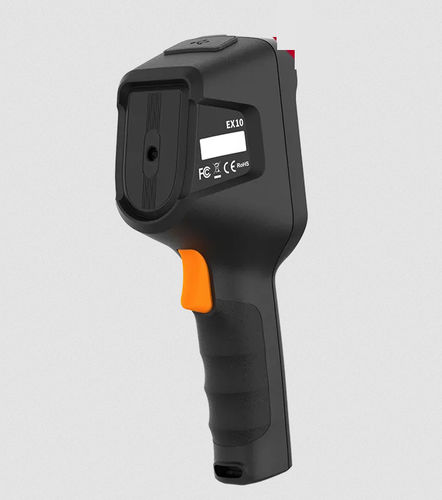
The EX10 handheld thermal camera is a handheld radiometric thermal imaging product that supports portable temperature measurement and PC-based analysis.
EX10 Handheld Thermal Camera
EX10 Handheld Thermal Camera
When Do You Need Radiometric Thermal Imaging?
Choose a radiometric system when the decision hinges on temperature or on a comparison that must remain meaningful across time, assets, or operating states. Common needs include documenting an inspection, trending a surface, comparing similar components under comparable load, screening against a defined temperature criterion, or preserving data for later analysis.
An imaging-only system can be sufficient when relative contrast answers the question. Examples include locating a hot spot, detecting a thermal target, or observing a pattern change without assigning a calibrated temperature.
Consider a routine equipment inspection. An imaging-only camera may reveal that one bearing housing appears warmer than others on similar machines. A radiometric camera can record an estimated surface temperature at a spesific point and support trending under comparable operating conditions. The temperature pattern still does not identify the cause by itself.
Temperature Monitoring for Electrical Cabinets in Power Distribution Rooms
The decision should come before the specification comparison. If the answer must report a defined surface temperature under specified conditions, radiometric capability is part of the requirement. If you only need to know that “this component is warmer than that one”, a qualitative workflow may be enough, although a radiometric record can still improve documentation.
How to Specify a Radiometric Thermal Imaging System
Start with the measurement, not the camera catalog. Define:
Target and surface: material, coating, condition, viewing angle, and whether reflections can be controlled.
Smallest feature: physical dimensions and how many detector elements must cover the measurement area.
Working distance and optics: minimum and maximum distance, field of view, focus requirement, and any external window.
Temperature span: expected minimum, maximum, and normal operating range.
Environment: atmospheric path, humidity, ambient temperature, vibration, contamination, and enclosure needs.
Required result: qualitative image, spot value, area statistics, trend, alarm output, report, or exported dataset.
Data workflow: radiometric file type, metadata, post-capture correction, software compatibility, export format, and retention.
Required performance: acceptable uncertainty, repeatability, reference method, and verification procedure.
Then test the proposed configuration with a representative target and workflow. Confirm focus and target coverage at the real distance, verify that the expected temperatures remain in range, save the original radiometric file, and complete the intended analysis and export steps.
Frequently Asked Questions
Does radiometric mean the temperature reading is accurate?
Not by itself. Radiometric means the camera has a calibrated method for estimating temperature. The result is useful only when the target is within the supported range and the required correction inputs match the scene. The surface and reflected environment must be understood, and focus and target coverage must be adequate.
Can you change emissivity after saving a thermal image?
Sometimes. The original file must preserve the required radiometric data, and compatible software must allow that input to be changed. A screenshot or ordinary color video usually preserves only the visual rendering, so changing emissivity later cannot recover measurement data that was never saved.
Does every pixel in a radiometric image show the true temperature?
A radiometric camera can calculate a temperature estimate for each pixel in its radiometric image, but that estimate is not automatically the surface’s true temperature. The measurement model uses calibration data and radiometric inputs; focus, target coverage, emissivity, reflections, atmosphere, and optics still influence the result.
Define the Measurement Before Choosing the Camera
Radiometric thermal imaging is the right tool when temperature data changes the decision. Its value comes from the complete chain: a suitable surface and viewing geometry, calibrated camera, appropriate radiometric inputs, preserved radiometric file, compatible software, and a repeatable procedure.