#Product Trends
Thermal Imaging for Motor Maintenance: A Practical Guide
Motor thermal inspection helps maintenance teams identify unusual heat patterns on operating motors and decide where further checks are needed. This guide answers three practical questions: what changed, where should the team check next, and which me
Motor thermal inspection helps maintenance teams identify unusual heat patterns on operating motors and decide where further checks are needed. This guide answers three practical questions: what changed, where should the team check next, and which method can be used to locate the problem? This guide follows that path from the first scan location through thermal camera selection.
What can thermal inspection reveal about motor problems?
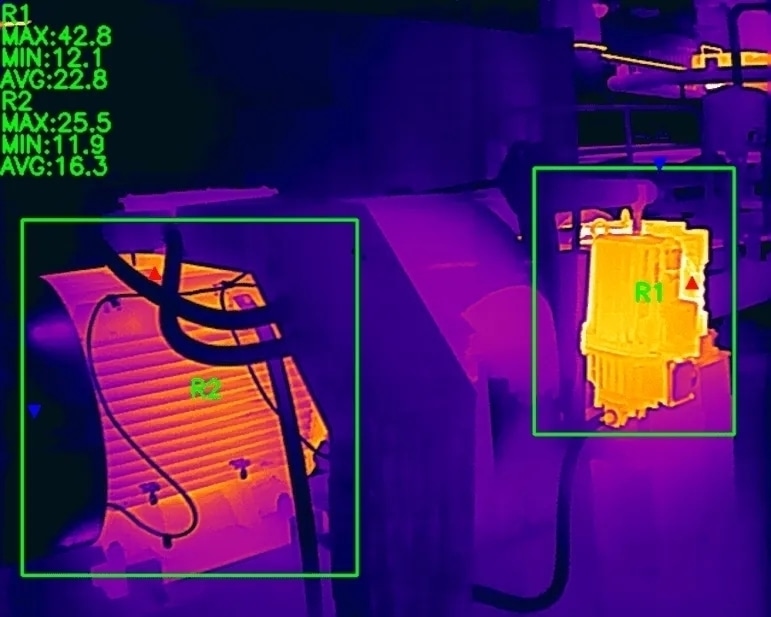
Thermal image of industrial machinery monitored for overheating risks
Thermal inspection helps a team compare what a motor’s exterior is doing while it runs. It gives a fast view of heat patterns on the frame, end bells, terminal area, cooling parts, and nearby driven equipment. That makes it useful for route work, repeat checks, and focused troubleshooting.
Choose one reference: the motor’s earlier image, the opposite end, or another motor doing the same work. Record the operating state because starting, cycling, and process demand all change the heat pattern. ASTM E1934 describes infrared examination as a way to identify and document exceptions; other tests establish the cause.
The camera shows heat on the exterior, not the condition inside windings, bearings, insulation, or connections. The location of a hot area tells the team where to look next: a terminal-area difference directs attention to the electrical system; an end-bell or coupling difference directs attention to the mechanical system.
Seeing a clear hot pattern and trusting an exact temperature are different tasks. A clear pattern can guide comparison. An exact temperature needs suitable focus, surface inputs, viewing geometry, and measurement settings.
The rest of this guide explains where to scan, how to capture a repeatable image, what to verify after a changed pattern, and which camera capabilities fit the job.
Where should you inspect a motor with a thermal camera?
Blue industrial electric motor with cooling fins
Build the route around areas that are visible from a safe position and can be compared over time. Include the motor frame, both end-bell or bearing areas, terminal or connection surfaces, cooling hardware, coupling, gearbox, and driven equipment when they are accessible. Raytron Industrial’s guide to industrial infrared equipment monitoring covers these motor and drive-train inspection areas.
Inspection area What to compare Why it matters
Housing or frame. Broad pattern, side-to-side change, and the chosen reference. It helps separate a motor-wide change from a local feature.
Drive-end and non-drive-end bearing or end-bell areas. Both ends and the baseline. It focuses the mechanical review on the end that differs.
Terminal or connection area. Terminals, phase-related areas, and reflections. It identifies an area for electrical inspection.
Fan, fins, and inlet area. Air path, fan-side pattern, and cleanliness. It helps show whether the cooling path needs review.
Coupling, gearbox, and driven equipment. The connected components and current process load. It extends the comparison to the drive train and load path.
The table is an inspection map, not a diagnosis map. Keep framing and focus consistent across the route, and note reflections or enclosure geometry that could change the image.
Choose the path before raising a camera. Note guards, viewing ports, obstructions, and the smallest feature that matters. If energized electrical access is needed, site rules and qualified personnel govern the work. That local boundary keeps the route practical without turning the inspection into a procedure manual.
How should you prepare and capture a motor thermal image?
A useful capture starts before the camera is powered on. Select the reference, then record the conditions that can change the pattern.
Record the operating or process state in plain language. Note whether the motor is starting, steady, cycling, lightly loaded, or working through an unusual process demand. Record available load context, ambient conditions, local airflow, enclosure condition, and nearby heat sources. These factors can change how the frame sheds heat and how a comparison should be read.
Set the view with purpose. Identify the area to examine, the working distance, the angle, and any guard or reflective surface that affects the image. Focus on the feature that will drive the next decision. A whole-motor view establishes context; a closer view may be needed for an end bell, terminal area, inlet, or coupling. Focus, distance, lens choice, and target size determine how much useful detail the image contains. Raytron Industrial’s guide to selecting an industrial handheld thermal camera explains how target size and working distance relate to resolution, field of view, and focus.
Keep the capture repeatable. Use the same side, framing, focus, and point in the operating cycle where practical. Record any difference between the current conditions and the reference, and save the original image or measurement file when later review depends on it.
How should you interpret common patterns and identify the next check?
A change in the thermal pattern can indicate where further investigation is needed. First, check whether differences in operating conditions or image capture could explain the change.
A warmer terminal area needs a different check from a whole housing that becomes warmer during a process change. The first route leads to electrical measurement. The second starts with current, voltage, load, and cooling-path checks.
Observation Common causes to investigate What to verify next
Warmer terminal or connection area. Increased connection resistance, a loose or degraded connection, or a circuit imbalance. Rule out reflection, then inspect the connection and take the required electrical measurements under site procedure.
Warmer bearing or end-bell area. Lubrication condition, bearing wear, misalignment, or a change in mechanical load. Compare both ends and review vibration, lubrication history, alignment, and motor duty.
Broad housing heat. Higher load, voltage or current imbalance, or reduced cooling. Check process load, current, voltage, ambient conditions, and cooling airflow.
Different fan, inlet, or fin pattern. Blocked airflow, dirt buildup, damaged fins, or abnormal fan operation. Inspect the air path and fan, correct visible restrictions, and repeat the thermal comparison.
Warmer coupling, gearbox, or driven-equipment area. Misalignment, lubrication condition, wear, or a change in process load. Review vibration, alignment, lubricant or gear condition, and process data.
These are investigation routes, not one-to-one fault signatures. The useful distinction is practical: the observed location narrows the cause categories, and the follow-up method separates them. ASTM E1934 lists lubrication, misalignment, worn components, and mechanical loading among causes of warm mechanical exceptions. The U.S. Department of Energy motor sourcebook places infrared scanning alongside vibration, lubricant analysis, insulation-resistance measurement, and electrical motor diagnostics.
Keep the written observation descriptive: where the pattern appeared, what it was compared with, and which check comes next.
What can affect a motor thermal image and temperature reading?
Control the factors that affect the decision you are making. For pattern comparison, start with focus and target coverage. The camera must show enough detail to distinguish the feature from nearby surfaces. Distance, field of view, viewing angle, and reflections can change that detail.
Thermal camera software interface for online temperature analysis with region measurement, line measurement, and temperature trend curve.
For an indicated temperature value, review emissivity, reflected apparent temperature, surface condition, angle, and focus. Emissivity describes how effectively a surface emits infrared energy; bare or polished metal also reflects more of its surroundings. The guide to emissivity in thermal imaging by Raytron Industrial explains why the surface and the camera setting must be considered together.
Atmosphere and an external window matter when they sit between the camera and the target. A short open-air view and a measurement through an optical window are different measurement paths. Check the documentation for the specific camera, lens, window, and software to see which inputs and corrections the setup supports.
File format also matters. Confirm the file type and software support that later review requires before capture, especially when another person will review the result.
Use the same discipline when reading an indicated value. First ask whether the surface and view support the measurement inputs. Then ask whether the decision needs a comparative pattern, a temperature value, or both. This order avoids spending time refining a value when the inspection question is really about where the pattern differs.
What should you check after finding an unusual motor heat pattern?
Choose the next method by the evidence that is still missing. Send a terminal-area difference to electrical inspection or measurement. Send a bearing or end-bell difference to vibration, lubrication, or alignment review. Check current, voltage, load, process, and cooling when the whole motor changes. Check airflow, fan operation, and cleanliness when the inlet or cooling pattern changes.
Repeat the thermal capture when poor focus, a process change, a weak reference, or a reflection compromised the first image.
Use a de-energized or complementary test when the unanswered question concerns electrical integrity, insulation condition, or mechanical condition. The selected method depends on the asset, the plant’s practices, manufacturer information, and local requirements.
Avoid a fixed escalation ladder. The right sequence depends on the consequence of the decision, the quality of the comparison, and the question left open. The useful handoff is simple: describe the observed pattern, the comparison conditions, and the check that will confirm its source.
Follow-up work should answer the specific question raised by the image. Electrical checks separate connection or circuit issues. Mechanical checks separate bearing, alignment, or drive-train issues. Process and cooling checks show whether the change belongs to the motor or its operating environment. The thermal image is valuable because it directs those checks to the right area.
Selection requirements should be written in the same order as the field work. Start with the target and view. Then state the comparison or measurement decision. Finally, list the file and review needs. This makes it easier to compare category options without assuming that every setup needs the same features.
Which camera capabilities fit the inspection?
Select camera capabilities from the inspection context, not from a presumed fault. Start with the target. Define the smallest exterior detail that must be distinguished, the working distance, the available viewing angle, and any enclosure or optical path. Those inputs guide the field of view, focus needs, and target coverage. The practical question is whether the camera can resolve the required feature from the position where the inspection will actually be performed.
Then define the decision. Some routes need pattern comparison only. Others need reviewable temperature values, compatible files, or software analysis. State which output matters before comparing camera options. Add the operating environment, surface characteristics, comparison method, and any existing software constraints to the selection requirements.
Use this short selection checklist:
Target area and smallest detail that must be distinguished.
Working distance, viewing angle, obstructions, and any window in the path.
Motor duty, process state, ambient conditions, airflow, and comparison reference.
Need for pattern comparison, indicated temperature values, or both.
Required file type, review workflow, annotations, and retained measurement data.
Documentation and exact-model or software requirements to confirm.
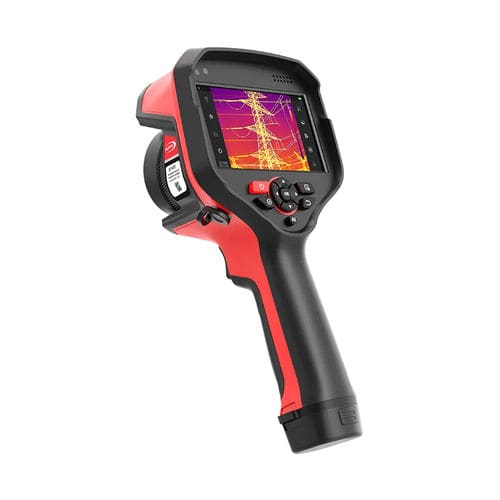
When selecting a handheld thermal camera for motor inspection, consider the size of the target, working distance, thermal sensitivity, required temperature range, and available lens options. These factors help determine which models are suitable for the inspection task. For more guidance, see this guide to selecting an industrial handheld thermal camera by Raytron Industrial. You can also compare options in the industrial temperature-measurement camera range, checking each model’s specifications and software capabilities against your requirements.
RT400 Expert Thermal Camera, Professional Thermal Camera
RT400 Expert Thermal Camera
Close the inspection loop by comparing the visible pattern, choosing the relevant follow-up check, and using a camera setup that fits the work.
A good selection conversation begins with those field details. It can then focus on target coverage, viewing geometry, file and software needs, and the type of comparison the team expects to make. That is a more reliable starting point than choosing equipment from a named fault or a single published specification.