#Product Trends
How OGI Cameras Detect Ammonia Leaks
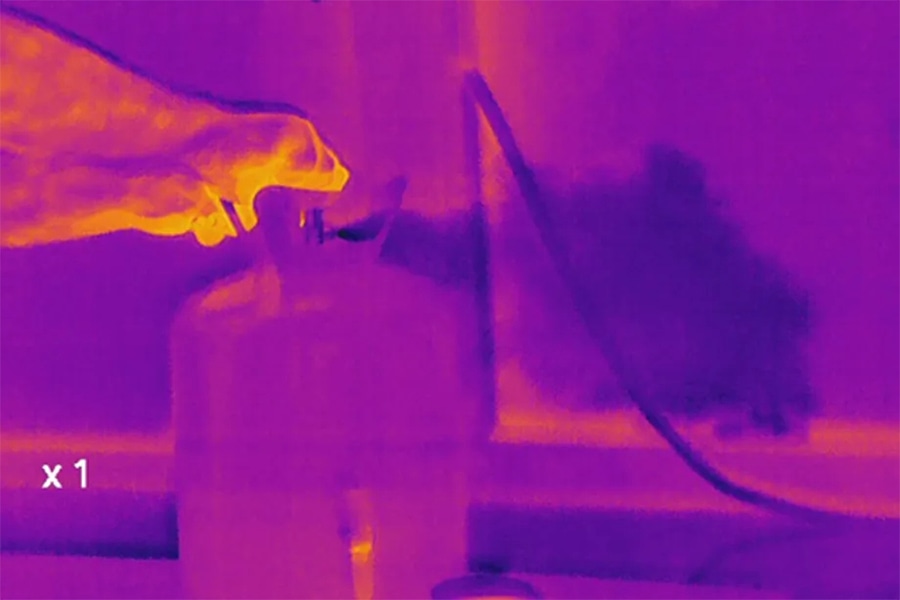
An optical gas imaging (OGI) camera can help an industrial team find an ammonia plume without touching the equipment. The operator scans the scene and looks for a moving gas pattern near the suspected source. This can make a large refrigeration area
An optical gas imaging (OGI) camera can help an industrial team find an ammonia plume without touching the equipment. The operator scans the scene and looks for a moving gas pattern near the suspected source. This can make a large refrigeration area faster to inspect than checking every point at close range.
The camera must be built and configured for ammonia. A normal thermal camera is not enough. The result also depends on the lens, focus, distance, background, air flow, and viewing angle.
This guide focuses on the camera itself: how it creates the image, which features matter, how to set it up in the field, and how to use the image during an industrial survey.
What the camera actually detects
An ammonia OGI camera does not image the gas in visible light. It detects a change in infrared radiation along the optical path.
Thermal Camera Application in Gas Detection
Infrared radiation travels from the background toward the camera. When an ammonia plume crosses that path, the gas absorbs radiation in part of the infrared spectrum. A camera with the correct spectral response and filter can detect the difference. Image processing then helps the operator see the changing signal as a moving plume. For a deeper explanation of this optical chain, see how optical gas imaging cameras work.
Four parts must work together:
The camera must respond to a spectral region where ammonia absorbs infrared radiation.
The plume must pass between the camera and a useful background.
The scene must provide enough radiant contrast for the detector.
The plume must produce a detectable pattern that stands out from background noise and scene movement.
If one part is weak, the plume may look faint or may not appear at all.
Why a standard thermal camera is different
A standard thermal camera mainly shows surface temperature. It is designed to compare infrared radiation from solid objects such as pipes, motors, tanks, and electrical parts.
An OGI camera adds a gas-specific optical design. Its detector and filter must match the absorption behavior of the target gas. A camera configured to detect other gases should not be assumed to detect ammonia.
For procurement, the key question is not “Is this an infrared camera?” It is “Does the exact camera model and optical configuration support ammonia detection?” The guide of Raythink | Raytron Industial to which gases OGI cameras can detect explains why gas coverage changes with the optical band.
Camera features that matter for ammonia imaging
Start with gas compatibility, then check whether the complete imaging system fits the job. General thermal image quality cannot replace a verified ammonia configuration.
Camera feature Why it matters in the field What to check
Documented ammonia support Gas detection depends on the optical configuration. Current manufacturer documents that list NH₃ for the exact model.
Spectral response and filter The optical band must match an ammonia absorption feature. The detector and filter fitted to the camera.
Detector resolution Resolution affects how much detail the operator can see around small or distant parts. Detector format in relation to survey distance and target size.
Lens and field of view The lens controls scene coverage and the apparent size of the source. Lens options, field of view, and expected camera-to-source geometry.
Focus control Poor focus can hide a weak plume or make its source hard to locate. Manual or automatic focus and how it works with the planned distance.
Gas-enhancement modes Suitable processing can make plume motion easier to recognize. Available gas-imaging modes and how the operator controls them.
Image and video recording A saved image must show enough context for maintenance follow-up. Video, still images, time stamps, notes, and export formats.
Industrial field design The camera must suit the planned work environment. Operating temperature, battery life, protection, controls, and any site equipment rules.
Exact wavelengths, sensitivity values, and detection limits are model-specific. Check them in the current documents for the exact camera. Do not copy a value from another model or use a laboratory result as a general field promise.
Field setup affects the plume image
A camera may support ammonia and still produce a poor image. OGI performance depends on the whole scene, not only the detector. The U.S. EPA overview of OGI detection limits identifies gas properties, camera design, distance, background, and environmental conditions as important factors.
infrared gas imaging ammonia leak detection
Field factor What the operator may see Practical action
Background contrast A plume can disappear against a weak or complex background. Change position so the plume crosses a simpler background with stronger infrared contrast.
Line of sight Pipes, insulation, guards, or structures can block part of the plume. Use another approved viewing position instead of assuming the source is clear.
Distance and field of view A wide view covers more equipment but may make a small plume harder to locate. Match the lens and distance to the size of the target area.
Focus Soft edges and image blur make plume motion harder to separate from the scene. Refocus when the survey distance or target plane changes.
Viewing angle One angle may hide the source behind nearby equipment. Scan from more than one safe angle when site access allows it.
Wind or ventilation Air flow changes plume direction, speed, and dispersion. Watch the movement pattern and record the air-flow conditions.
Steam, rain, reflections, and moving equipment Other motion or infrared effects can look like gas or hide it. Pause, change the view, or compare the pattern from another position.
Equipment operating state A release may appear only during a certain process condition. Record whether the system is running, idle, loading, relieving, or in another known state.
There is no single field distance, temperature difference, or concentration that guarantees a visible ammonia plume in every scene. The operator must judge the actual image and record the conditions under which it was captured.
A negative image also has limits. If no plume appears, check focus, background, angle, distance, air flow, and the camera’s ammonia configuration before closing the observation.
How to set up the camera for an industrial survey
A repeatable camera routine helps different operators cover the same area and understand each other’s records.
Confirm the ammonia configuration
Check the exact model, detector, filter, lens, and current gas list before fieldwork. If the documents do not list ammonia for that setup, do not infer support from the product family.
Plan practical viewing positionsUse the site route and equipment layout to identify clear views of the areas in scope. Note access limits, blocked views, and the nearest and farthest practical distances. Site work controls still govern where the operator may stand.
Build a usable scene
Place the suspected gas path against a background that helps the camera show contrast. Avoid unnecessary clutter when another view is available. Keep enough surrounding equipment in the frame to identify the source later.
Set focus and imaging mode
Focus on the target plane, then select the suitable gas-imaging mode. Do not use digital zoom as a substitute for a better lens, closer approved position, or correct focus.
Scan in a stable pattern
Move through the planned area in a consistent order. Hold the view long enough to see plume motion. Change angle when nearby equipment hides the source or the background is poor.
Save the finding with context
Record the image or video, asset or area, time, operating state, viewing distance, background, and known air-flow conditions. A close plume image is useful, but a wider context image can help maintenance staff find the same location.
Using the camera in ammonia refrigeration areas
For ammonia refrigeration, the route can be organized by operating area. This keeps the camera work tied to the plant layout rather than an unproven universal list of leak-prone parts.
Area Camera use View conditions
Ammonia receiving and storage Scan visible ammonia-bearing equipment and interfaces in the defined area. Identify clear backgrounds and record the operating activity.
Condenser area View accessible equipment from positions that show both the source area and plume path. Account for outdoor wind, structures, and changing backgrounds.
Ammonia piping and pressure vessels Follow the visible gas path through the planned route. Adjust focus and angle as pipe distance and orientation change.
Refrigeration spaces Scan the areas included in the site’s survey scope. Note ventilation, blocked views, and moving equipment.
Machine room Use a stable route to cover the equipment included in the work plan. Manage background clutter and preserve clear asset context in recordings.
Other ammonia applications require an inspection route based on the specific process and equipment layout. A fertilizer plant, chemical plant, loading terminal, or storage site should not reuse a refrigeration route without checking its equipment and operating conditions.
What the camera image tells the operator
The OGI image is most useful for three tasks:
showing that a plume-like infrared pattern is present in the viewed scene;
helping the operator narrow the likely source area; and
creating visual evidence for maintenance follow-up and later comparison.
The image alone does tell you everything. A qualitative OGI view does not establish the exact gas concentration, worker exposure, leak rate, or safe-entry condition. The site’s approved ammonia detector, fixed or personal monitoring system, and work procedure remain responsible for those decisions.
This defines where OGI fits into the inspection process: it can scan a large area, make the plume visible, point the team toward the source, and preserve a clear record.
What to send when asking for a camera recommendation
A useful camera review begins with the application, not a generic product request. Send the supplier enough information to check the optical setup and field use.
An option for ammonia surveys
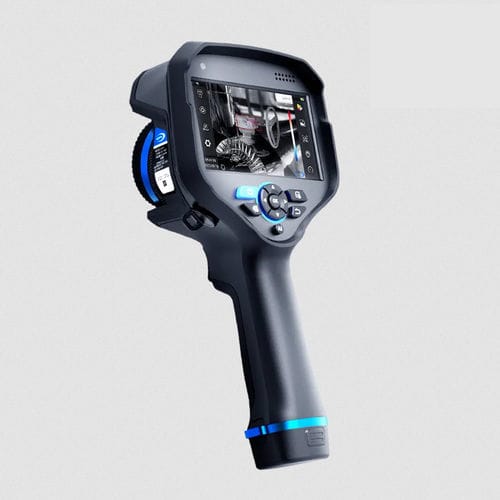
For portable ammonia leak surveys, the RG630F OGI handheld camera is the relevant Raythink | Raytron Industrial model to evaluate. Its 10.3–10.7 μm spectral range and customized filter detector support ammonia detection. The camera also provides 640 × 512 infrared resolution, manual focus, gas-image enhancement, gas-cloud coloring, image and video recording, and geolocation support for inspection work.
RG630F OGI Handheld Camera
RG630F OGI handheld camera
Before purchase, give the supplier a real survey example, such as the distance to a compressor seal, the available viewing angle, and whether the area has hazardous-location requirements. The review should cover:
ammonia as the target gas and the process in which it is used;
the facility type and the areas included in the survey;
the suspected source geometry and approximate target size;
the nearest and farthest practical viewing distances;
likely backgrounds, blocked views, and viewing angles;
indoor ventilation or outdoor wind and weather;
the equipment operating states that the survey must cover;
required image, video, annotation, and report formats;
battery, portability, control, and data-transfer needs; and
site equipment or access requirements that affect camera use.
Ask the supplier to identify the exact ammonia-capable configuration. The response should cover the detector, filter, lens, focus method, imaging modes, recording workflow, field assumptions, and current supporting documents.
Keep the camera at the center of the survey
An ammonia OGI survey starts with the correct camera configuration and suitable viewing conditions. The operator then controls focus, lens coverage, background, angle, and recording quality. These choices determine how useful the plume image will be for maintenance.
Planning an ammonia survey? Share the equipment to be inspected, the typical viewing distance, and the site conditions, and contact Raythink | Raytron Industrial. We can help you choose the right camera and prepare for the survey.