#Industry News
Thermal Shock Testing: How to Investigate IC Cold-Start Failures
Investigate IC cold-start failures after thermal shock testing using chamber records, measured package temperature and a SANWOOD Temperature Forcing System.
An integrated circuit (IC) passes its room-temperature electrical check after thermal shock testing. At low temperature, the same device starts on one attempt and fails on the next. For a semiconductor reliability team, the first task is to reproduce the symptom under documented conditions. The next is to compare it with any cold-start data collected before exposure. That comparison determines what the team can conclude about a change in device behavior.
What the room-temperature check tells you
Thermal shock testing exposes IC packages to rapid changes between specified hot and cold conditions. As the die, substrate, and other package materials expand and contract at different rates, repeated exposure can stress interfaces and interconnects. The test method defines the temperature limits, transition requirements, dwell periods, and number of cycles. A room-temperature pass shows how the device performed under the conditions of that electrical check. If cold startup matters to the application, it needs to be evaluated under its own defined conditions.
Trace the device back to its thermal shock exposure
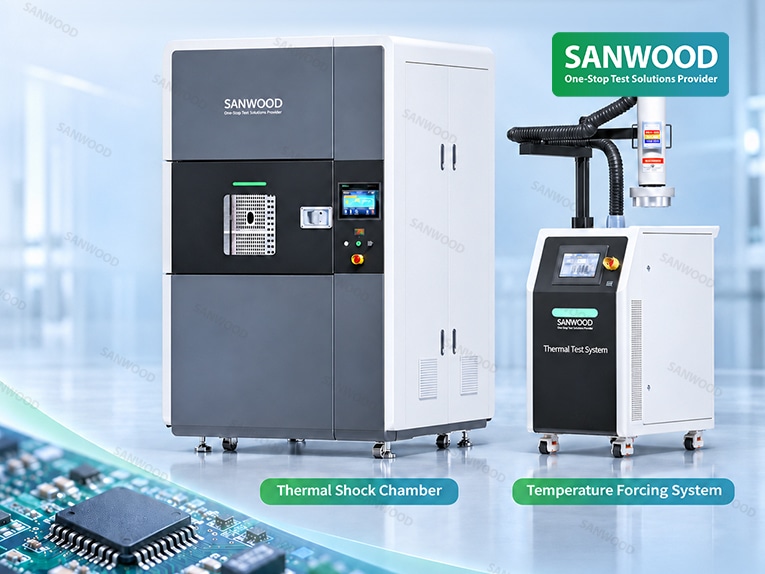
A SANWOOD Thermal Shock Chamber provides the specified hot and cold exposure for air-to-air testing. In a two-zone configuration, a carrier moves the samples between the hot and cold zones. In a three-zone configuration, the samples remain stationary while dampers switch the airflow path. This difference matters when arranging the sample fixture or routing attached temperature leads.
When an intermittent failure appears, start with the device ID and its chamber-run reference. Pull the temperature records, note the fixture position if it was logged, and confirm the recovery conditions and timing of the room-temperature electrical check. File the supplemental cold-start results separately from the qualification readout so reviewers can identify which checks were required by the original test plan.
Reproduce the cold start at a measured package temperature
A SANWOOD Temperature Forcing System directs temperature-controlled airflow through a thermal head to the selected device area. External electrical instruments apply power, execute the startup sequence, and record the response. If the symptom occurs when a cold, unpowered IC first receives power, reproduce that sequence. Cooling a device while it is already running answers a different question.
Log the air setpoint and the measured package temperature separately. The air can reach its target while the package is still cooling. Define the temperature measurement point and stabilization criterion before testing, then record the package temperature at startup. Across attempts, keep the fixture, supply voltage, startup sequence, and power-off interval consistent. Report the number of failed starts out of the total attempts to make intermittent behavior easier to compare.
Decide what the comparison supports
A cold-start pass before exposure and a failure afterward, under comparable conditions, show a change in observed behavior. Failure analysis is still needed to identify its cause. If the only pre-exposure result was a room-temperature pass, document the conditions that reproduce the cold-start symptom and leave its onset undetermined. If changing the socket or board changes the result, investigate that setup effect before attributing the failure to the IC.
When reviewing equipment with SANWOOD, share the required thermal shock profile and sample load for the chamber. For the cold retest, provide the fixture layout, target package temperature, sensor location, and electrical access requirements. Those details help define what each setup needs to demonstrate with the actual device and fixture.
For more details on the test setup, equipment selection, and interpretation of retest results, read the full article on SANWOOD’s website:https://www.sanwood.us/news/214.html
Explore SANWOOD equipment:
Thermal Shock Chamber · Temperature Forcing System
Contact SANWOOD
Email [email protected]