#Product Trends
Clamp-on Ultrasonic Flow Meter Troubleshooting: No Signal, Low Q Value, and Unstable Readings
Clamp-on Ultrasonic Flow Meter Troubleshooting: No Signal, Low Q Value, and Unstable Readings
Preserve the evidence before changing the setup
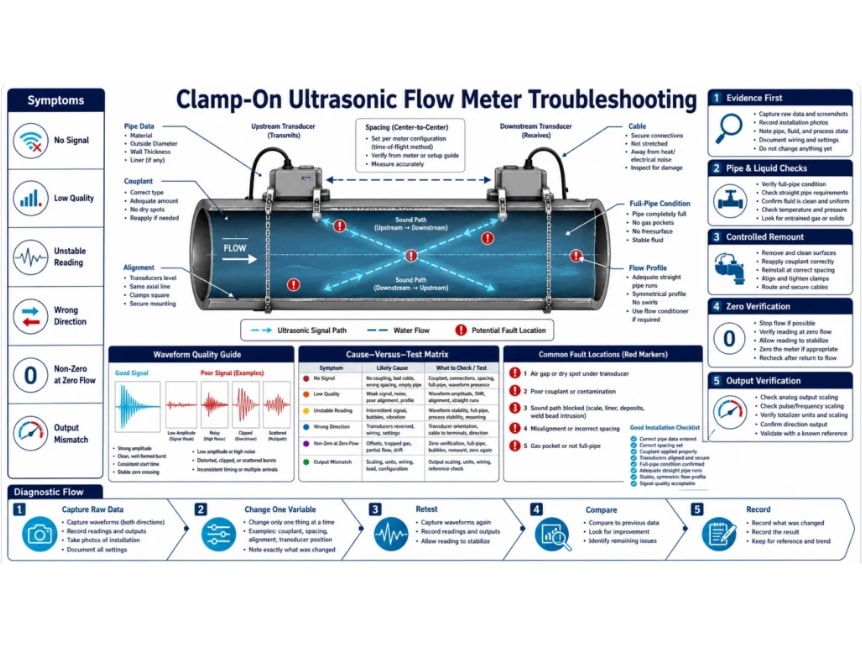
A clamp-on ultrasonic flow meter fault can originate in the instrument, transducers, cables, entered pipe data, coupling, mounting geometry, pipe condition, liquid, flow profile, power, or output mapping. Several causes produce the same visible symptom. Moving the sensors and changing five parameters at once may restore a number, but it removes the evidence needed to know which cause mattered.
Begin by saving the configuration and recording the displayed flow, sign, totalizer, received signal, quality or correlation indicator, upstream and downstream transit times, time ratio, gain, sound velocity, error code, process state, and time. Different manufacturers use “Q,” signal quality, correlation, or confidence differently. Do not apply a threshold from another model; interpret each diagnostic using the manual for the installed instrument.
Build a fault record
Instrument, firmware, transducer type, cable identity, power source, and output configuration.
Pipe outside diameter, wall, liner, material, surface condition, and entered values.
Liquid, temperature, pressure, solids or gas, full-pipe status, and known process changes.
Arrangement, calculated and measured spacing, axial alignment, orientation, couplant, and mounting date.
Upstream and downstream disturbances with distances and photographs.
Raw diagnostic screens during the fault and, if available, during known good operation.
Trend the symptom if it is intermittent. Record whether it follows flow rate, pump operation, temperature, valve position, rain, vibration, a production recipe, or a particular time. Correlation is not proof, but it determines which controlled test should be run first.